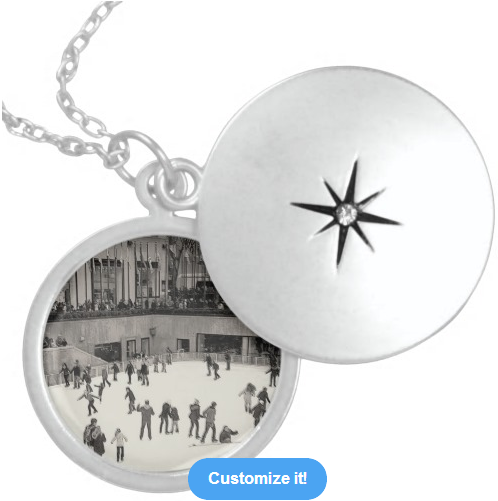
I've made a small, but very important update to this post that will help you create better looking custom keepsake locket or necklace jewelry pieces.
Near the end of my last post I stated that I expect most of the folks buying keepsakes would use their own photos. So, in today's post I'm going to blog about how to use your own images to create one of a kind, custom keepsake jewelry.
Looking to buy keepsake jewelry for yourself or someone special? Zazzle gives its customers the option to (1) buy an existing design they like, or (2) customize/personalize that design, or (3) upload their own photo, artwork or custom text to create their own totally unique design. This post is for people who want to go the option 3 route to create their own custom keepsake locket or necklace jewelry on Zazzle.
 |
| You Can Create Your Own Custom Keepsake with this Necklace Template |
Don't get me wrong ... as a designer I would love to sell you one of my Diamond Lights custom sterling square necklace or Sterling black & white vintage skating at the Rink locket designs. BUT the whole point of creating custom keepsake jewelry is to make something special that will be kept and remembered, because it reminds you (or the person you're giving it to) of someone, some place, some thing or event that's special to you (or them). So using your own image would make the keepsake that much more meaningful to you and the person you're giving it to.
Zazzle makes the process of creating your own custom products fairly easy. Just follow these 5 steps:
- Go to Zazzle.com and choose a template necklace to create your keepsake;
- Using the basic design tool, add your artwork, photo and/or custom text - please carefully follow the Zazzle image guidelines, which can be found here: http://www.zazzle.com/mk/custom/imageguidelines;
- Position your image and/or text within the visible design area;
- Select the Style (round/square necklace or round locket), Color (silver plated, gold finish or sterling silver) & Size (small, medium or large) that best suits your image & your budget; and
- When you've completed your design, select the quantity you want to order, click on 'Add to Cart' and checkout.
I can't state this enough - if you want to create the best looking keepsake possible, please follow Zazzle's image guidelines (see item 2. above) and recommended image sizes& resolutions. For round lockets, Z recommends an image size of 288 by 288 pixels with an image resolution of at least 200 ppi. For square necklaces, it's 276 x 276 pixels with the same image resolution of 200 ppi. I recommend using a higher image resolution of at least 300 ppi; for my designs, I use 600 ppi. Also, using a larger sized image that fills out the visible design space beyond the bleed area will result in a much better looking design when printed onto your locket or necklace.
You can get good results with free online based editors like Pixlr.com or even PicMonkey. You don't need Photoshop to make your images look great! GIMP is an excellent free desktop program, but there will be a bit of a learning curve in figuring out how to work with it. Paint.NET is another free image editor that is very good. I have used it to produce some fantastic results and in my opinion, there's not as much of a learning curve with it as with the GIMP. It just takes a little consistent practice.
So are you ready to create your own custom keepsake jewelry piece? I believe that by following what you've read in this post, you will definitely be able to design great looking, memorable custom personalized jewelry on Zazzle. Post any questions or comments you have on how to do this in the comments section below.